Built in lists in Java
List interface
List is an interface in Java (for the time being, just assume that an interface is a collection of method headers - very loose definition but it will do for now).
The most frequently used methods from List are:
| Method | Description |
|---|---|
get(int): Object |
returns Object at passed index (IndexOutOfBoundsException if the index is out of range) |
size(): int |
returns number of items in the list (0 if empty) |
add(Object) |
adds passed object at the end of the list (IndexOutOfBoundsException if the index is out of range) |
add(int, Object) |
adds (at the given index) the object passed (IndexOutOfBoundsException if the index is out of range) |
remove(int): Object |
removes and returns Object at given index. (IndexOutOfBoundsException if the index is out of range) |
remove(Object): boolean |
removes first occurrence of given Object and returns true. Returns false if item not found |
contains(Object): boolean |
returns true if passed object exists in the list, false otherwise |
indexOf(Object): int |
returns first index at which passed object exists (-1 if it doesn’t exist in the list) |
lastIndexOf(Object): int |
returns last index at which passed object exists (-1 if it doesn’t exist in the list) |
toString():String |
returns String representation of the list (comma-separated items inside square brackets) |
Classes implementing List interface
The two classes that implement the methods from List interface are:
- ArrayList - Stores items in an array (contiguous block of memory).
- LinkedList - Stores items linked to each other spread over the memory (not as a block).
These classes implement other methods as well but they definitely implement all methods from List.
The two classes differ in how the items are stored (we’ll look at that in the sections (custom-built arraylist)[] and custom-built linkedlist).
Creating and operating on List objects
Creating a list
A list cannot hold variables of primitive data types (like int, boolean, double, char). Instead it must hold objects of corresponding classes provided by Java (Integer, Boolean, Double, Character respectively)
A list is typically parameterized with the type of objects it must hold.
For those interested in learning about this, check out Java Generics
Creating a List
1
ArrayList<Integer> list = new ArrayList<Integer>();
This creates a list that can holds integer values (as Integer objects) in an internal array elementData.
You can similarly create a LinkedList object as,
1
LinkedList<Double> grades = new LinkedList<Double>();
We will look at storage when we talk about custom-built linked lists.
Adding items at the end
1
2
3
4
5
list.add(10);
list.add(70);
list.add(20);
list.add(90);
//list = [10, 70, 20, 90]
If it’s an ArrayList, inside object list, the values are held in an instance variable array named elementData. Thus, in this case, list.elementData = {10, 70, 20, 90}
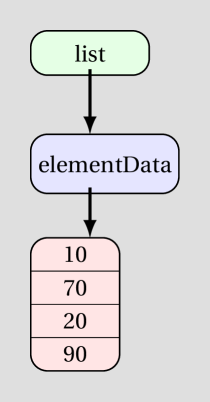
NOTE: A LinkedList holds objects differently from an ArrayList. We’ll talk more about that later.
Adding items at arbitrary index
1
2
3
4
5
6
7
8
9
10
list.add(0, 30);
//list = [30, 10, 70, 20, 90]

list.add(2, 4);
//list = [30, 10, 4, 70, 20, 90]

list.add(list.size(), 30); //after the last item
//list = [30, 10, 4, 70, 20, 90, 30]

list.add(20, -60); //throws IndexOutOfBoundsException
Removing an item at a specific index
1
2
3
4
5
6
list.remove(5);
//list = [30, 10, 4, 70, 20, 30]

list.remove(-3); //throws IndexOutOfBoundsException

list.remove(6); //throws IndexOutOfBoundsException
Removing a specific object
The only scenario in which this is tricky is a list containing Integers, because the type of the object and the type of the index is the same (int or Integer).
1
2
3
4
5
6
7
list.remove(4);
//removes item at index 4, not the item 4. list = [30, 10, 4, 70, 30]

//if you want to remove THE ITEM 4, you must pass it as Integer object

list.remove((Integer)4);
//removes item 4. list = [30, 10, 70, 30]
Iterating over the list
Following example adds the items in the list
1
2
3
4
5
int total = 0;
for(int i=0; i < list.size(); i++) {
	total = total + list.get(i);
}
//total = 30+10+70+30 = 140
Checking existence and location of items in list
1
2
3
4
5
6
7
8
//note: list = [30, 10, 70, 30]
boolean flag = list.contains(10);   //flag = true
boolean status = list.contains(20); //status = false

int idx1 = list.indexOf(70);        //idx1 = 2
int idx2 = list.indexOf(40);        //idx2 = -1
int idx3 = list.indexOf(30);        //idx3 = 0
int idx4 = list.lastIndexOf(30);    //idx4 = 3
Storing list contents in a String or displaying it
1
2
String str = list.toString(); //str = "[30, 10, 70, 30]"
System.out.println(list);     //toString() called, displays [30, 10, 70, 30]
Passing lists to methods
Lists are passed to methods like any other object. Since a shallow copy of the passed list is made into the formal parameter, modifying the contents of a list in a method results in the contents of the passed list being modified too.
COMPREHENSIVE EXAMPLE 1
Context
- A list,
outcomes, should be created so that it contains the outcomes of a “normal” 6-faced die (singular of dice) being rolledNtimes. - Store and display, a variable
nSixes, that holds the number of times a 6 was rolled. - Store and display, a variable
average, that holds the average outcome. - Store and display, a variable
noTwoAdjSame, that holds valuetrueif none of two adjacent (one after the other) outcomes the same,falseotherwise. - Store and display, a variable
mostFreq, that holds the most frequent outcome.
Solution: DiceRollSimulation.java
Methods operating on lists
Just like any other object, you can pass lists to methods. Example for task 3 (average) provided below:
Method definition
1
2
3
4
5
6
7
public static double getAverage(ArrayList<Integer> data) {
	int total = 0;
	for(int i=0; i < data.size(); i++) {
		total = total + data.get(i);
	}
	return total / (double)data.size();
}
Method call
1
double average = getAverage(list);
COMPREHENSIVE EXAMPLE 2
Context
Consider the Rectangle class defined in Rectangle.java
- Create a LinkedList of 20 rectangles, each having a random width and height (each between 1 and 8 - inclusive on both sides)
- Display all rectangles with area of 10 or more.
- Display the indx of the first rectangle whose area is more than the rectangle after it.
- Display the area of the biggest rectangle (in terms of area).
- Create and display another list of rectangles named
squareListcontaining all squares from your list.
Solution: RectangleClient.java
Practice project (homework)
Write a piece of code that,
- Creates an ArrayList of String objects.
- Add 10 names of your choice to the list (first name followed be last name).
- Display the longest name in the list.
- Display the count of names that are more than 10 characters in length.
- Display the index of the first name that ends with an ‘n’. If no name ends with an ‘n’, display
no name ends with character 'n'. - Display all names that begin with a specific letter. The list and the letter should be passed as parameters to the method that displays these names.
- Create another list,
shortNames, with all names from your list that are less than 8 characters in length. - Sort your list in alphabetic order. Note that the String class contains
compareTo(String)that orders the calling object and parameter object in alphabetic order.